
_461938.png)
_89d3ab.png)
_78ef2e_1903c3.png)
_78ef2e.png)
About the Venue
Upcoming Events
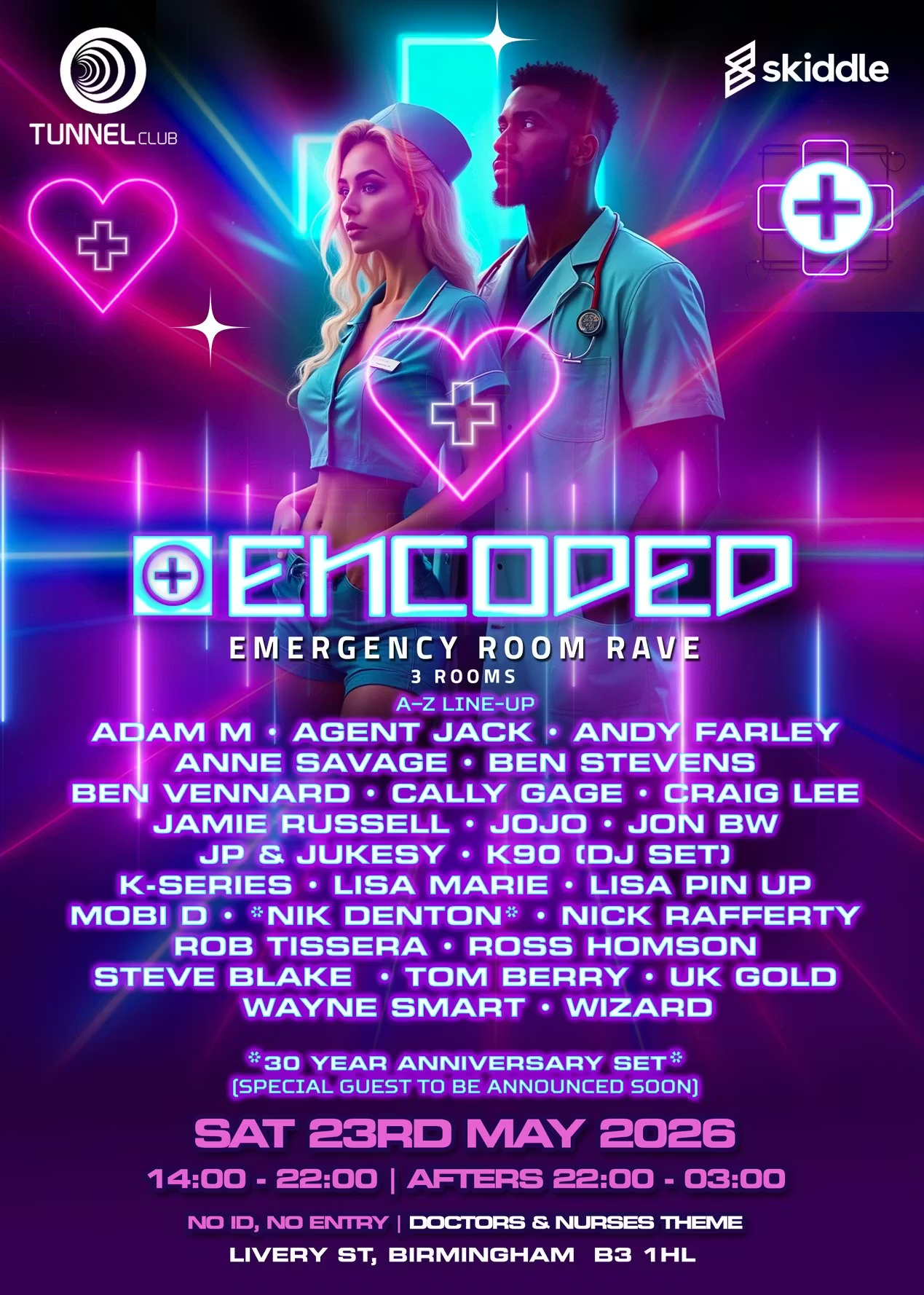
ENCODED: Emergency Room Rave – Doctors & Nurses Theme
Rob Tissera | Lisa Pin-Up | Anne Savage | Ben Stevens | K90 | Cally Gage | Andy Farley | Nik Denton | Wayne Smart | Jon BW | Steve Blake | Tom Berry | Nick Rafferty | DJ Ross Homson
Music Genres: Trance | Hard House | Hard Trance | Hard Dance | Bounce
🎉 ENCODED – FULL CLUB TAKEOVER 🎉
📍 The Tunnel Club, Livery Street, Birmingham, B3 1HL
🔐 Photo ID required – no ID, no entry
After a sold-out event with Frantic, Encoded returns to take over The Tunnel Club – bigger, louder, and wilder than ever! Dress up for our Doctors & Nurses theme and dive into a full-day club experience. 🩺💊
What to Expect:
🔊 Massive line-up across 3 rooms
🏟️ Expanded venue with full transformations
💡 Lasers, LEDs, and live visuals
🛋️ Chill-out zone (far room by the toilets)
💨 Extra fans for the ultimate rave atmosphere
Room Highlights:
Main Room: Hard House
Room 2 (upstairs): Hard Dance | Hard Trance | Bounce – now bigger with full lighting rig
Room 3 – The Grove Box: 135–145 BPM Hard House
Event Schedule:
Main Event: 2 PM – 10 PM (Last entry 6 PM)
After Party: 10 PM – 3 AM (Last entry 12 AM)
🔥 Encoded’s biggest club event in 16 years! Three rooms of non-stop music, state-of-the-art sound systems, and immersive visual production.
Line-up announcement: End of summer – prepare for something massive.
Tickets
skiddle.com
Encoded - Emergency Room Rave at The Tunnel Club
ENCODED: Doctors & Nurses theme We're back after a sell-out with Frantic! 3 rooms + after party, lasers, LEDs & visuals.Flyer
Rob Tissera | Lisa Pin-Up | Anne Savage | Ben Stevens | K90 | Cally Gage | Andy Farley | Nik Denton | Wayne Smart | Jon BW | Steve Blake | Tom Berry | Nick Rafferty | DJ Ross Homson
Music Genres: Trance | Hard House | Hard Trance | Hard Dance | Bounce
🎉 ENCODED – FULL CLUB TAKEOVER 🎉
📍 The Tunnel Club, Livery Street, Birmingham, B3 1HL
🔐 Photo ID required – no ID, no entry
After a sold-out event with Frantic, Encoded returns to take over The Tunnel Club – bigger, louder, and wilder than ever! Dress up for our Doctors & Nurses theme and dive into a full-day club experience. 🩺💊
What to Expect:
🔊 Massive line-up across 3 rooms
🏟️ Expanded venue with full transformations
💡 Lasers, LEDs, and live visuals
🛋️ Chill-out zone (far room by the toilets)
💨 Extra fans for the ultimate rave atmosphere
Room Highlights:
Main Room: Hard House
Room 2 (upstairs): Hard Dance | Hard Trance | Bounce – now bigger with full lighting rig
Room 3 – The Grove Box: 135–145 BPM Hard House
Event Schedule:
Main Event: 2 PM – 10 PM (Last entry 6 PM)
After Party: 10 PM – 3 AM (Last entry 12 AM)
🔥 Encoded’s biggest club event in 16 years! Three rooms of non-stop music, state-of-the-art sound systems, and immersive visual production.
Line-up announcement: End of summer – prepare for something massive.
Tickets
skiddle.com
Encoded - Emergency Room Rave at The Tunnel Club
ENCODED: Doctors & Nurses theme We're back after a sell-out with Frantic! 3 rooms + after party, lasers, LEDs & visuals.Flyer
