
_461938.png)
_89d3ab.png)
_78ef2e_1903c3.png)
_78ef2e.png)
Murmur with Rob Pearson

Event created by ClubTheWorld
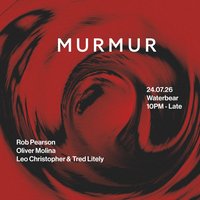
Murmurations - the label behind Brighton's Murmur event series - celebrates the release of Flock Vol. 1, their debut various artists EP, with a night built around the record and the people who made it.
Heading the lineup is Rob Pearson, founder of Evasive Recordings and a longstanding figure in UK tech house. His collaboration with Paul Donton sits on the A1, and it's a fitting centrepiece: Rob is a selector rooted in flow and feel, with decades of digging behind him. His sound draws a direct line from the late 90s and early 2000s tech house era - a period that's very much back in focus, with a new wave of DJs reaching back to those original blueprints.
Label head Leo Christopher, whose track Underground also features on Flock Vol. 1, steps behind the decks alongside Murmur resident Tred Litely - a pairing that keeps things close to the source.
Support comes from Oliver Molina of Haptic Records, one of the city's sharpest selectors and most respected promoters.
DJs / Artists: ROB PEARSON, Leo Christopher, Tred Litely
Genres: Deep House, House, Tech House, Techno
Venue: The WaterBear Venue, Brighton
Event listing provided by Skiddle.
