
_461938.png)
_89d3ab.png)
_78ef2e_1903c3.png)
_78ef2e.png)
Leicester Vipers 30+ Daytime Disco

Event created by ClubTheWorld
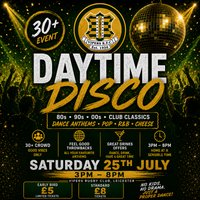
Leicester Vipers RFC presents our 30+ Daytime Disco — a feel-good afternoon packed with throwback tunes, great drinks and a proper dance.
If you love the idea of a night out but don’t fancy being out until 3am, this one’s for you. We’re bringing the party earlier, with a brilliant mix of 80s, 90s and 00s classics, club anthems, pop, R&B, dance and a bit of cheese.
Expect a friendly 30+ crowd, a relaxed local atmosphere and plenty of tunes you’ll know from start to finish.
Whether you’re coming with friends, your partner, teammates, parents from school, workmates or just fancy a good afternoon out, everyone’s welcome.
Event details:
📍 Venue: Leicester Vipers RFC
📅 Date: Saturday 25th July
⏰ Time: 3pm – 8pm
🎶 Music: 80s, 90s, 00s, club classics, pop, R&B, dance and cheese
🎟️ Tickets: Early Bird £5 / Standard £8
👥 Age guide: 30+ event
No kids. No drama. Just a proper dance — and home at a sensible time.
Early bird tickets are limited, so grab yours early and get ready for a brilliant afternoon at Leicester Vipers RFC.
Genres: Cheesy Dance, Club Classics, Disco, Hip Hop, Old Skool
Venue: Leicester Vipers Rugby Club, Leicester
Event listing provided by Skiddle.
