
_461938.png)
_89d3ab.png)
_78ef2e_1903c3.png)
_78ef2e.png)
Hillside Festival 2026
Event created by ClubTheWorld
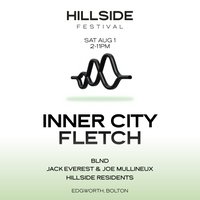
Hillside 2026 - get ready for some big fun 🕺💚
All the way from Detroit to Bolton - we're proud to welcome Inner City 🌇
As pioneers of the Detroit house and techno movement, Inner City helped define the sound of a generation, influencing dancefloors around the world for over three decades. Responsible for timeless anthems like Good Life and Big Fun, their music remains a cornerstone of global dance music culture.
We are also delighted to welcome FLETCH. Within the last few years, his career has gained serious momentum, earning support from legendary artists including The Martinez Brothers, Marco Carola, Jamie Jones, ANOTR and many more.
With over a million streams this year alone and upcoming releases on Circoloco Records, ThreeSixZero and Moxy, there's truly no stopping his meteoric rise 🚀
Last but not least, we welcome Bolton's very own BLND, who are quickly making a name for themselves with a strong run of releases receiving support from the likes of Jamie Jones and Marco Carola.
After months in the making, this is officially our biggest edition yet - featuring a brand-new second stage, with more announcements still to come.
🎟️ Early bird tickets are live now
Link in bio.
DJs / Artists: Inner City, Joe Mullineux, BLND UK, FLETCH (GB)
Genres: Disco, House, Tech House, Techno
Venue: Hillside Festival, Bolton
More from Inner City:
- The Great Fete — 8 Aug 2026
Event listing provided by Skiddle.
