
_461938.png)
_89d3ab.png)
_78ef2e_1903c3.png)
_78ef2e.png)

Event created by ClubTheWorld
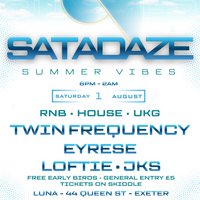
Satadaze: Summer Vibes lands in Exeter for a full day-to-night celebration of sunshine sounds, high energy rhythms and serious dancefloor moments.
Taking over Luna on Queen Street, this special summer edition brings together a stacked lineup of DJs delivering the best in RNB, House and UK Garage, creating the perfect soundtrack for warm summer evenings and late night sessions.
Headlining the night are Twin Frequency, known for their electrifying sets and signature UK sound that blends bassline energy with crowd-moving house grooves. Joining them on the lineup is Eyrese, alongside Loftie and JKS, each bringing their own flavour to the decks to keep the vibe flowing from start to finish.
Expect feel-good anthems, bass-heavy rollers, sing-along RNB classics and the kind of atmosphere that only happens when the right music meets the right crowd. Whether you're coming to dance, link up with friends or just soak in the summer energy, Satadaze: Summer Vibes is built to deliver exactly that.
The party kicks off early and runs late, giving you eight hours of music from 6PM until 2AM.
With free early bird tickets available and general entry just £5, it's one of the best value nights in the city this summer.
📍 Luna
44 Queen Street, Exeter
🗓 Saturday 1st August
⏰ 6PM - 2AM
Come early, stay late, and bring the summer energy with you. 🌴🎶
Genres: House, R&B, UK Garage
Venue: LUNA, Exeter
Event listing provided by Skiddle.
