
_461938.png)
_89d3ab.png)
_78ef2e_1903c3.png)
_78ef2e.png)

Event created by ClubTheWorld
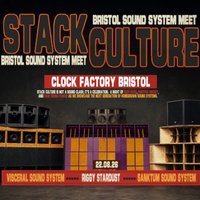
JUNGLE | DNB | BREAKS | TEK | HARCORE | UKG | BASSLINE | DONK | BOUNCE
Sound system culture has shaped UK music from dub and reggae through to jungle, grime and modern bass music. Rooted in Caribbean heritage, community and craft, it is a culture built on bass, unity and shared experience.
In Bristol and the South West, sound systems have always been more than speakers. They are voices of the underground, platforms for local talent and a foundation of the region’s musical identity.
Following three rammed shows, Stack Culture returns on Saturday 22nd August for another night of heavy sound and shared passion. This is not a sound clash, it is a celebration. A gathering of people, crews and systems in connection.
OUR THREE GUEST RIGS
VISCERAL SOUND SYSTEM
RIGGY STARDUST
SANKTUM SOUND SYSTEM
Come meet the rigs, connect with the crews and link up with like-minded heads. Expect deep basslines, handcrafted stacks and real sound system culture done properly.
With grassroots venues under pressure across Bristol, Clock Factory is opening its doors to support independent sound system crews and give them space to showcase their rigs in a professional, welcoming environment.
🎟 FREE BEFORE 11PM – LIMITED TICKETS AVAILABLE
💷 £5 GUARANTEED ENTRY
Genres: Bass Music, Drum and Bass, Jungle, Techno, UK Garage
Venue: Clock Factory Bristol, Bristol
Event listing provided by Skiddle.
