
_461938.png)
_89d3ab.png)
_78ef2e_1903c3.png)
_78ef2e.png)

Event created by ClubTheWorld
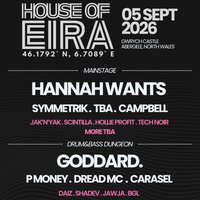
We're back at the iconic Gwrych Castle in Abergele, North Wales for round two of House of Eira, and this year we're going bigger, louder, and wilder than ever.
Saturday 5th September 2026
12PM - 10PM
Get ready for 10 hours, 1 castle, and hundreds of uscoming together for an unforgettable day and night. Expect more award-winning DJs bringing the best in house, techno, UKG, and DnB and a whole new level of energy.
We're opening up more areas of the castle to explore, adding more games and entertainment, and keeping the same amazing crew, same amazing location, and the same incredible energy that made House Of Eira 2025 so special.
House of Eira set the bar sky-high last year, and now we're back to raise it even further. Don't miss your chance to be part of round two.
Super Early Bird tickets are sold out!!
Early Bird tickets are sold out!!
grab your General Admission ticket now for just £30 before they disappear, and we'll see you at the castle for our Castle Takeover Part II.
Genres: Drum and Bass, House, Jungle, Techno, UK Garage
Venue: Gwrych Castle Preservation Trust Ltd, Abergele
More from P Money:
- RAW MATERIAL Presents - THE SHOCKWAVE - P MONEY + More — 18 Jul 2026
- Let It Roll — 30 Jul 2026
- Hospital30 Block Party — 1 Aug 2026
- Spangled X Rough Tempo -TNA, Nu:Elementz - Azza + Grima, P Money — 29 Aug 2026
Event listing provided by Skiddle.
