
_461938.png)
_89d3ab.png)
_78ef2e_1903c3.png)
_78ef2e.png)

Event created by ClubTheWorld
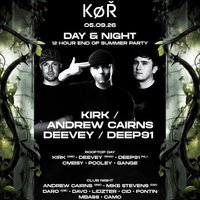
KOR returns to Cardiff for its biggest event of the summer as we take over District Cardiff on Friday 5th September for a huge 12-hour rooftop and club experience.
Expect an unforgettable journey from day into night, featuring 15+ DJs across two unique settings, bringing together some of the most exciting names from Ireland, Germany, England, The Netherlands and Wales.
The Rooftop Day Party kicks off with international guests KIRK (IRE), DEEVEY (ENG) and DEEP91 (NL), joined by CMBSY, POOLEY and GANGE, delivering high-energy and underground grooves and hard under the Cardiff skyline.
As the sun sets, the action moves inside for our Club Night takeover featuring ANDREW CAIRNS (IRE), MIKE STEVENS (DE) and DARO (DE), alongside DAVO, LIDSTER, CID, PONTIN, MBASS and CAMO, taking things deeper and harder until the early hours.
With 6 international artists, 15+ DJs, a rooftop day session, full club production and a crowd of true music lovers, KOR End of Summer is set to be one of Cardiff's standout dance events of 2025.
Friday 5th September
District Cardiff
Rooftop Day Party & Club Night
12 Hours • 15+ DJs • 6 International Acts
Limited tickets available now.
Genres: Bounce, Hard Dance, Hardcore/Hardstyle, Techno, Trance
Venue: District Cardiff, Cardiff
Event listing provided by Skiddle.
