
_461938.png)
_89d3ab.png)
_78ef2e_1903c3.png)
_78ef2e.png)
GASWRX Opening ft ARMAND VAN HELDEN, DANNY HOWARD, PRUNK & MORE

Event created by ClubTheWorld
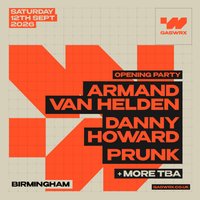
GASWRX Birmingham opens on Saturday 12th Sept 2026 with a huge official opening party headlined by global house music icon ARMAND VAN HELDEN
One of the most influential names in dance music, Armand Van Helden has soundtracked generations of club culture with era-defining records including You Don’t Know Me, My My My, I Want Your Soul and countless others. For the launch of GASWRX, he heads to Birmingham for a major headline show inside the city’s newest destination for music, culture and large-scale events.
Joining the opening line-up are BBC Radio 1’s DANNY HOWARD Dutch house favourite PRUNK, plus more acts still to be announced.
Expect a full-scale opening night built around big-room energy, world-class sound, striking industrial surroundings, heavyweight production, premium guest areas and multiple event spaces. GASWRX has been created to host major artists, international brands, live shows, club events and unforgettable cultural moments in the heart of Birmingham.
This is the first chapter for a new venue and a new era of events in the city.
The official opening party starts here.
Genres: Deep House, Disco, Disco House, House, Tech House
Venue: GASWRX, Birmingham
More from Armand Van Helden:
- Brighton Pride - Pride on the Park 2026 — 1 Aug 2026
- Electric Paradise — 8 Aug 2026
- ARMAND VAN HELDEN, SOSA & MORE | Groovebox Keel SQ Summer Fest — 29 Aug 2026
- Nightvision presents Armand Van Helden // Edinburgh — 5 Sep 2026
Event listing provided by Skiddle.
