
_461938.png)
_89d3ab.png)
_78ef2e_1903c3.png)
_78ef2e.png)
Event created by ClubTheWorld
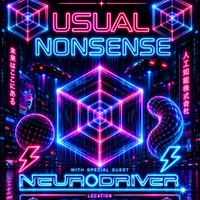
Step into a night where rhythm rules and reality blurs.
Join us as we journey through deep, tribal grooves, lush melodic house, hypnotic progressive beats, and trippy sonic textures. It's not just a party-it's a pulse, a flow, a space where sound becomes sensation.
Expect driving percussion, dreamy synths, and dancefloor alchemy crafted to move both body and mind. Whether you're chasing euphoria or just vibing in the shadows, this is your kind of nonsense.
Let go. Lock in. Lose yourself in the nonsense.
Special Guest: Neurodriver
Also celebrating our resident DJ's 40th Birthday, so this one is a special event that will have lots of surprises in store!!
DJs / Artists: Neurodriver, Running Colour, Spätkauf (SK), Ériu (DJ)
Genres: Acid House, Electronic, House, Prog House, Techno
Venue: Brighton Electric, Brighton
Event listing provided by Skiddle.
