
_461938.png)
_89d3ab.png)
_78ef2e_1903c3.png)
_78ef2e.png)
Sander Van Doorn / Marco V / Lange / Standerwick - Southampton

Event created by ClubTheWorld
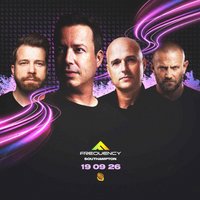
Frequency returns to the garden on Saturday 19th September 2026 with an elite lineup, featuring a UK-exclusive B2B never before seen in the UK.
Set against the lush backdrop that's become synonymous with the series, this much-anticipated return brings the unmistakable Frequency energy back where it belongs - under open skies, surrounded by great music lovers, and powered by a mega SANDER VAN DOORN b2b MARCO V exclusive aswell as solo sets from each. Joining this monster line up are the legendary Frequency favourites LANGE and STANDERWICK completing this classic line up. Expect cutting-edge sounds, euphoric moments, and the kind of atmosphere that only Frequency knows how to create.
Whether you're there for the music, the setting, or the shared buzz on the dancefloor, this is more than just a date in the diary - it's a celebration. As day turns to night, the garden will once again come alive with unforgettable performances, deep connections, and that signature Frequency magic. Mark your calendars. This is one you won't want to miss.
Tickets purchased via 3rd party ticket outlets are at the customer own risk and will not guarantee entry. Only tickets purchased on Skiddle are guaranteed entry
Tickets are non refundable
Genres: Tech House, Techno, Trance
Venue: Sobar Southampton, Southampton
More from Sander Van Doorn:
- Goodgreef 25 Years - Plymouth — 8 Aug 2026
Event listing provided by Skiddle.
