
_461938.png)
_89d3ab.png)
_78ef2e_1903c3.png)
_78ef2e.png)

Event created by ClubTheWorld
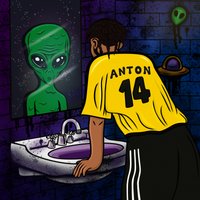
👽 Be Your Alien | 2nd Edition 👽
Full Lineup TBA...
The first event featured artists including: Latte, Selecta J-Man, Kara, Scuffed and Anton.
✨ What is 'Be Your Alien'? ✨
• 'Your alien' is the most authentic version of yourself; who you are when no one else is around, your fully unique and uninfluenced personality.
• 'Be Your Alien' is an encouragement to fully embrace your alien, honouring that unfiltered version of yourself instead of trying to 'fit in'.
• When we apply this concept to artists, it becomes an event: a night where artists play not what is expected of them, but the unique tastes that rarely make it into their usual sets under their artist profile. It's a peek behind the curtain at their personal preferences and influences, an insight which goes beyond genre boxes and crowd expectations.
• 'Be Your Alien' also pushes back against how many music events currently operate: hype-driven, optimised for clips, and pressured by algorithms. It removes all of this and puts the focus back on the room, the music and the moment.
Expect:
A safe environment.
Huge headline set filled with amazing support acts
Inflatable aliens & merchandise.
Top tier soundsystem.
A no phones/recording policy
See you there. Be Your Alien.
Genres: Bassline, Drum and Bass, Hard Dance, Jungle, UK Garage
Venue: Lost Horizon HQ, Bristol
Event listing provided by Skiddle.
