
_461938.png)
_89d3ab.png)
_78ef2e_1903c3.png)
_78ef2e.png)
ER 360 Weekender: Southampton DJ Community FREE RAVE

Event created by ClubTheWorld
This event begins 10/04/2026 and repeats every week on Friday and Saturday until 10/04/2026
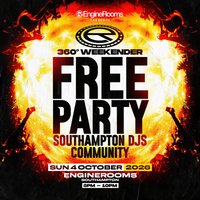
Join us on Sunday 4th October 2026 for a special edition of the ER 360 Weekender, bringing together Southampton's DJ community for an evening of music, networking, collaboration and live performances.
Throughout the event, DJs from across the local scene will be taking to the unique 360° stage, showcasing their sound and representing the incredible talent Southampton has to offer. Whether you're a seasoned DJ, an aspiring artist, a producer, promoter, event organiser or simply a fan of electronic music, this is your chance to connect with the people shaping the local scene.
Expect an evening of great music, fresh talent, industry conversations and opportunities to meet like-minded creatives in a relaxed and welcoming environment.
What to expect:
• Live DJ performances on the 360° stage
• Networking with DJs, promoters, producers and music lovers
• Opportunities for future collaborations and bookings
• A chance to discover new local talent
• A welcoming space for everyone involved in the music community
📅 Date: Sunday 4th October 2026
⏰ Time: 5:00 PM – 10:00 PM
🎟️ Entry: FREE (ticket required)
Whether you're looking to perform, network, collaborate or simply enjoy an evening of quality music, the ER 360 Weekender is the perfect place to be.
Download your free ticket and be part of Southampton's growing music community.
Genres: Bassline, Drum and Bass, Hard Dance, House, UK Garage
Venue: EngineRooms, Southampton
Event listing provided by Skiddle.
