
_461938.png)
_89d3ab.png)
_78ef2e_1903c3.png)
_78ef2e.png)
Insane Limelight The Masquerade Ball

Event created by ClubTheWorld
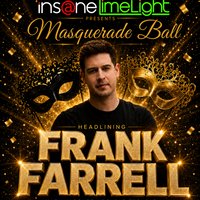
🎭 INSANE LIMELIGHT PRESENTS: MASQUERADE BALL 🎭
After weeks of planning, we can finally reveal what we’ve been working on…
On Saturday 21st November, Insane Limelight takes over the legendary CU Club Dalston for a very special Masquerade Ball experience packed with hard house energy, big atmosphere and a touch of elegance.
🔥 HEADLINING 🔥
FRANK FARRELL
Alongside an incredible supporting lineup featuring:
Karl Vasquez
Double Trouble
Gizmo B2B Blackjack
The Raggy One
Bliss & Barry Harding
Expect uplifting vibes, hands in the air moments, quality music and a proper London club atmosphere from start to finish.
🎭 Dress to impress
🎶 Hard House classics & future anthems
💥 Huge energy all day long
📍 CU Club
574-576 Kingsland Road, London E8 4AH
🗓 Saturday 21st November
⏰ 2PM till late
🎟 Early bird tickets just £15 — limited availability.
This is more than just another event… this is INSANE LIMELIGHT.
#HardHouse #InsaneLimelight #MasqueradeBall #FrankFarrell #LondonRaving #CUClub #HardHouseFamily
Genres: Hard Dance, Hard House
Venue: CU CLUB 574 576 KINGSLAND RD, LONDON E8 4AH, London
Event listing provided by Skiddle.
