
_461938.png)
_89d3ab.png)
_78ef2e_1903c3.png)
_78ef2e.png)
PaSSion Trance ClaSSics

Event created by ClubTheWorld
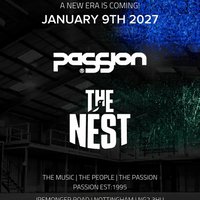
HEADLINE: PaSSion announces a new era for 2027.
PaSSion & The Nest, Nottingham agree a deal for 2027.
Promoter and resident DJ, Jason Kinch (JFK) quotes
‘When booking venues for our PaSSion events, we look for the best and safest spaces possible to bring our wonderful DFOP’s (Dedicated Followers of PaSSion)
After scouring the East Midlands, we believe that The Nest in Nottingham offers us everything we are looking for, and we are extremely excited for the next part of our historic journey’
The Nest in Nottingham is a versatile, multi-purpose event space and fan zone located on Iremonger Road, adjacent to Notts County FC's Meadow Lane stadium.
Originally a former warehouse/factory, it now serves as a dynamic community hub, sports viewing venue, and lively event space.
Nottingham itself offers up fantastic hotel opportunities and excellent transport links for those travelling from around the UK and beyond.
Sam Heaton, The NEST events and sales manager told us ‘We are pleased to welcome such an iconic brand into The Nest, we are excited at working with some of the biggest dance music artists, past and present’
The first of a series of events will be announced in due course, with the first being the annual ‘PaSSion Trance ClaSSics’ set be scheduled for Jan 9th, 2027.
Tickets on sale Friday June 12th, 2026, at 10:00.
Genres: Hard Dance, Techno, Trance
Venue: Nottingham's The Nest (Notts County FC), Nottingham
More from JFK:
- Soul Disco Society — 18 Jul 2026
- Back 2 Festival 2026 - The 10th Birthday — 6 Aug 2026
- JFK presents FORTY years of Fantastic Plastic — 12 Sep 2026
- Back 2 Ibiza 2026 — 27 Sep 2026
Event listing provided by Skiddle.
