
_461938.png)
_89d3ab.png)
_78ef2e_1903c3.png)
_78ef2e.png)
BOUNCIN @ Fusion Burnley

Event created by ClubTheWorld
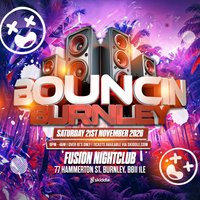
🔥 BOUNCIN' RETURNS TO FUSION, BURNLEY! 🔥
Saturday 21st November | 9PM - 4AM
After the incredible vibes at our summer event, we're taking things to the next level! Get ready for another massive night of non-stop bounce as we bring an all-star line-up of DJs & MCs together to deliver the biggest and best bounce anthems from start to finish.
Expect huge energy, packed dancefloors, unforgettable atmospheres, and nothing but the finest bounce music all night long.
This is BOUNCIN' at its biggest yet... don't miss it!
📍 Fusion, Burnley
🕘 9PM - 4AM
🎟️ Grab your tickets early - this one is going to be huge!
Genres: Bounce, Club Classics, Hard House
Venue: Fusion Event Space, Burnley
Event listing provided by Skiddle.
