
_461938.png)
_89d3ab.png)
_78ef2e_1903c3.png)
_78ef2e.png)
A State of Trance | Drumsheds, London - 25 Years of ASOT

Event created by ClubTheWorld
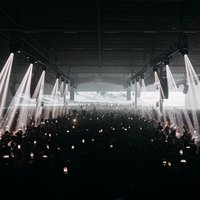
A State of Trance London lands at Drumsheds on Saturday 14th November 2026 for the first ever indoor ASOT festival in the UK, celebrating 25 years of one of electronic music’s most iconic global brands.
Headlined by the legendary Armin van Buuren, this landmark edition brings the full scale of A State of Trance to one of London’s most powerful industrial venues. Set within the vast former warehouse spaces of Drumsheds, ASOT London will deliver a festival-sized experience built around immersive production, cinematic visuals, state-of-the-art sound and the unmistakable energy of thousands of fans gathered under one roof.
For 25 years, A State of Trance has shaped the sound, culture and community of trance and progressive electronic music, growing from a radio show into a worldwide movement with landmark events across the globe. Now, ASOT enters a new chapter in the UK with a special anniversary edition designed for the scale, atmosphere and ambition of Drumsheds.
With Armin van Buuren leading the charge and the full lineup still to be announced, A State of Trance London is set to be a defining moment for trance in the capital.
Genres: Bass Music, Electro, Electronic, Trance
Venue: Drumsheds London, London
Event listing provided by Skiddle.
