
_461938.png)
_89d3ab.png)
_78ef2e_1903c3.png)
_78ef2e.png)

Event created by ClubTheWorld
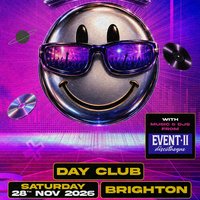
Back in the Day brings you Brighton's biggest over 30's day club!
The Event 2 Brighton Day club for over 30's
Bringing you the music, atmosphere & the people that made it so good!
SATURDAY 28th NOVEMBER
3pm - 8pm DAY PARTY!
Music supplied by some of the original DJ's 🎧 playing the music to get you dancing non stop! 🎶
Expect:
All the anthems you remember from that golden era of clubbing! 🎉
A nostalgic trip down memory lane! ❤️
An amazing atmosphere 🥳
FILLED WITH THE PEOPLE WHO LOVE THE MUSIC AND REMEMBER THE GOOD OLD DAYS! 🪩
Rolling back the glory years to bring you an afternoon of pure 90's entertainment!
Iconic 90's & 00's dance & house bangers!
Bringing you
The music to get you dancing non stop! 🎶
A nostalgic trip down memory lane! ❤️
FILLED WITH THE PEOPLE WHO LOVE THE MUSIC! 🪩
If you've been before, you'll know what we mean! 😜 If not, time to find out what all the fuss was about! 🎉
And don't forget, it's a DAY PARTY! ☀️
So drink, dance and be home on the couch before (its too) dark! 😎
See you on the old Event 2 dancefloor at PRYZM! 🎉
Genres: 1990s, 2000s, House, Old Skool, Trance
Venue: Pryzm Brighton, Brighton
Event listing provided by Skiddle.
