Jump to content
View in the app

A better way to browse. Learn more.

ClubTheWorld

A full-screen app on your home screen with push notifications, badges and more.

To install this app on iOS and iPadOS
  1. Tap the Share icon in Safari
  2. Scroll the menu and tap Add to Home Screen.
  3. Tap Add in the top-right corner.
To install this app on Android
  1. Tap the 3-dot menu (⋮) in the top-right corner of the browser.
  2. Tap Add to Home screen or Install app.
  3. Confirm by tapping Install.

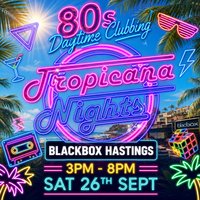
Event flyer

Get ready to dance the day away and relive the iconic 80s at Tropicana Nights! Whether you’re a child of the 80s or just love the era’s unforgettable beats, this is the party you don’t want to miss.

What to Expect:

Non-stop 80s music—From Madonna to Michael Jackson, Prince to Wham! All your favourite tracks will be playing all day.

Pure 80s Heaven—The ultimate setting to relive the glamour, the neon, and the unforgettable memories of the 80s.

Don't miss out—grab your friends, put on your best 80s outfit, and join us for a day of nostalgic fun and unforgettable vibes!

Genres: 1980s, Disco, Pop, Retro and Throwbacks, Soul

Venue: Blackbox Hastings, Hastings

🎟️ Get Tickets on Skiddle

Event listing provided by Skiddle.


Recommended Comments

There are no comments to display.

Create an account or sign in to comment

image.png
Clubbing the world together ...

Configure browser push notifications

Chrome (Android)
  1. Tap the lock icon next to the address bar.
  2. Tap Permissions → Notifications.
  3. Adjust your preference.
Chrome (Desktop)
  1. Click the padlock icon in the address bar.
  2. Select Site settings.
  3. Find Notifications and adjust your preference.