
_461938.png)
_89d3ab.png)
_78ef2e_1903c3.png)
_78ef2e.png)
TRIP is back!

Event created by ClubTheWorld
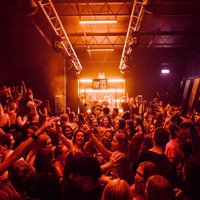
The first TRIP and last TRIP for a very long time! 🕰️
Everyone you know is back in Brum so lets leave Broad Street and Selly to the new freshers for a night!
After two weeks of the same music day in day out, trust us youll be crying out for something different so here we are... back due to very popular demand... enough Said x
⚡️The BIGGEST start of year celebration! ⚡️
🎧 Multiple Spaces Of Music
💨 BIG production
☀️ Open Air Disco Terrace
🔊More than just the same Broad St/Circo Playlist
🍹Student Drinks Deals
🚨Warning - Tickets Selling Very Fast 🚨
🎤 Don’t worry - TRIP is still all about putting a different spin on your favourite music with words its not an unz unz Rave and for those of you just coming for the hype we have multiple of different music too x
Genres: Disco, House, Tech House
Venue: Club Colette, Birmingham
Event listing provided by Skiddle.
