
_461938.png)
_89d3ab.png)
_78ef2e_1903c3.png)
_78ef2e.png)
SEKTOR presents a night of Dancefloor DNB at Helch Market

Event created by ClubTheWorld
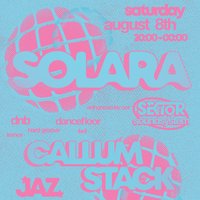
This August, SEKTOR takes over Helch Market for a high-intensity, four-hour journey through the absolute best in underground electronic music.
For this edition, we are moving completely away from standard club setups. We are transforming the entire space into a fully reactive, multi-sensory environment, combining an immersive custom lighting & visual productionwith the raw power of our own SEKTOR soundsystem layout. Expect a wall of heavy hardware, massive low-end, and a synchronized visual experience built from the ground up.
Leading the charge is our headliner SOLARA, alongside a heavy-hitting lineup of local selectors cutting through the finest tempos in the scene.
The Lineup
SOLARA (Headline)
CALLUM STACK
JAZ
RULU
The Sounds
DnB / Dancefloor / Hard Groove / Trance / 4x4
Essential Info
Date: Saturday, August 8th
Time: 20:00 - 00:00 (Last entry rules apply)
Venue: Helch Market, 3 Gervis Pl, Bournemouth, BH1 2AL
Tickets are limited for this high-spec production showcase. Secure your spot now via Skiddle and experience the next level of the SEKTOR layout.
Strictly 18+ | Valid Photo ID Required
Genres: Drum and Bass, Hard Dance, Trance
Venue: Helch Market, Bournemouth
Event listing provided by Skiddle.
