Jump to content
View in the app

A better way to browse. Learn more.

ClubTheWorld

A full-screen app on your home screen with push notifications, badges and more.

To install this app on iOS and iPadOS
  1. Tap the Share icon in Safari
  2. Scroll the menu and tap Add to Home Screen.
  3. Tap Add in the top-right corner.
To install this app on Android
  1. Tap the 3-dot menu (⋮) in the top-right corner of the browser.
  2. Tap Add to Home screen or Install app.
  3. Confirm by tapping Install.

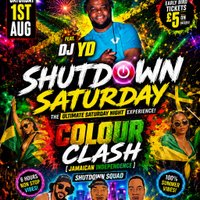
SHUTDOWN SATURDAY - [COLOUR CLASH] _Jamaican Independence_ (Saturday 1st August 2026)

Event flyer

⚠️ Shutdown Saturday ⚠️

🎆Colour Clash🎇 - [Jamaican independence]

🎇1st Aug - 1030pm_430am

🎆CLUB MAKOTO - WS1 3HR

🎇SHUTDOWN SQUAD feat. DJ L KING

Shutdown Squad hosting AUGUST Shutdown Saturday with a theme called ‘COLOUR CLASH’ for birmingham guest DJ YD💥

Its straight madness all night and if you been to Shutdown you know what we do - ‘When the Shutdown Banner goes up - Walsall goes down’ 😳😩💥

SH SH SHUTDOWN 💣

Genres: Bassline, Dancehall, Funky House, Hip Hop, R&B

Venue: Club Makoto, Walsall

🎟️ Get Tickets on Skiddle

Event listing provided by Skiddle.


Recommended Comments

There are no comments to display.

Create an account or sign in to comment

image.png
Clubbing the world together ...

Configure browser push notifications

Chrome (Android)
  1. Tap the lock icon next to the address bar.
  2. Tap Permissions → Notifications.
  3. Adjust your preference.
Chrome (Desktop)
  1. Click the padlock icon in the address bar.
  2. Select Site settings.
  3. Find Notifications and adjust your preference.