
_461938.png)
_89d3ab.png)
_78ef2e_1903c3.png)
_78ef2e.png)
SIDNEY CHARLES, LUUK VAN DIJK & more | Groovebox at SteelYard (Saturday 26th September 2026)

Event created by ClubTheWorld
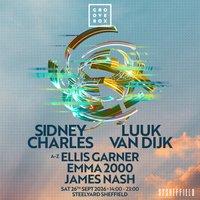
SIDNEY CHARLES, LUUK VAN DIJK & MORE AT STEELYARD!
Groovebox returns to Sheffield for a huge day-to-night celebration of underground electronic music at the iconic Steelyard Sheffield on Saturday 26th September 2026.
Bringing together a carefully curated lineup of rising stars and established selectors, this edition features standout performances from Sidney Charles and Luuk Van Dijk, two of the most respected names in contemporary house music. Joining them are Ellis Garner and Emma 2000, delivering a soundtrack of rolling grooves, cutting-edge house, and high-energy dancefloor moments from start to finish.
Expect world-class production, an electric atmosphere, and a crowd united by a passion for quality electronic music as Groovebox transforms Steelyard into one of the UK's essential dance music destinations.
Lineup
Sidney Charles
Luuk Van Dijk
Ellis Garner
Emma 2000
Event Details
Date: Saturday 26th September 2026 📆
Time: 14:00 - 23:00 ⏰
Venue: Steelyard Sheffield 📍
Genres: Tech House
Venue: SYSheffield (Steel Yard), Sheffield
More from Sidney Charles:
- Loveland Festival — 8 Aug 2026
- Appetite On The Farm — 29 Aug 2026
- ARMAND VAN HELDEN, SOSA & MORE | Groovebox Keel SQ Summer Fest — 29 Aug 2026
- SIDNEY CHARLES, LUUK VAN DIJK + MORE | Groovebox at Binks Yard — 26 Sep 2026
Event listing provided by Skiddle.
