
_461938.png)
_89d3ab.png)
_78ef2e_1903c3.png)
_78ef2e.png)
HALLOWEEN 𝐎𝐕𝐄𝐑 𝟑𝟎'𝐒 DaY PARTY IS COMING! (Saturday 31st October 2026)

Event created by ClubTheWorld
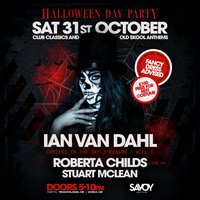
🎃👻 HALLOWEEN 𝐎𝐕𝐄𝐑𝟑𝟎'𝐒 DAY PARTY IS COMING! 👻🎃
Get ready for an unforgettable day of club classics, old skool anthems, 🕸️🦇
🔥 Ian Van Dahl - Performing iconic hits including Castles in the Sky, Reason & Will I Roberta Childs - Live PA & Stuart McLean
Saturday 31st October - Doors Open: 5PM - 10PM
🎭 Fancy Dress Highly Recommended
🏆 £100 Prize for Best Costume
Whether you're dressing as a zombie, witch, vampire, or something completely wild, this is the Halloween party you don't want to miss! #DONTMISSOUT
Genres: 2000s, Club Classics, House, Old Skool, Trance
Venue: Savoy Nightclub, Glasgow
Event listing provided by Skiddle.
