
_461938.png)
_89d3ab.png)
_78ef2e_1903c3.png)
_78ef2e.png)
PO4 Live Presents: Chicane + Support (Saturday 10th October 2026)

Event created by ClubTheWorld
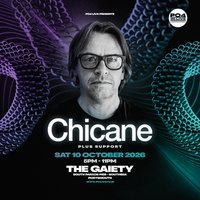
PO4 Live Presents: Chicane + Support
Get ready for an unforgettable night of trance, progressive house and Balearic vibes as Chicane lands at The Gaiety Southsea on Saturday 10th October 2026.
Famed for timeless anthems such as Offshore, Saltwater, Don’t Give Up and Stoned In Love, Chicane has spent decades shaping the sound of electronic music, blending euphoric melodies, atmospheric production and huge dancefloor moments into a truly iconic live experience.
Set against the stunning backdrop of South Parade Pier, this special PO4 Live event brings one of the UK’s most celebrated electronic artists to the South Coast for an intimate evening of classic trance and uplifting house, alongside a full line-up of carefully selected support DJs.
Event Details
Date: Saturday 10th October 2026
Venue: The Gaiety Southsea, South Parade Pier, Portsmouth
Time:5:00pm – 11:00pm
Last Entry:7:00pm
Expect sunset energy, hands-in-the-air classics, euphoric breakdowns and a feel-good atmosphere as we take over The Gaiety for a huge evening by the sea.
Please note:Last entry is strictly 7:00pm, so arrive early to enjoy the full show.
Tickets are expected to be in high demand — secure yours now for PO4 Live Presents: Chicane + Support.
Genres: Prog House, Trance
Venue: The Gaiety Southsea, Southsea
More from Chicane:
- An Evening With Chicane - Norwich — 26 Sep 2026
- An Evening With Chicane - Nottingham — 24 Oct 2026
- Chicane — 7 Nov 2026
- An Evening With Chicane - Glasgow — 14 Nov 2026
Event listing provided by Skiddle.
